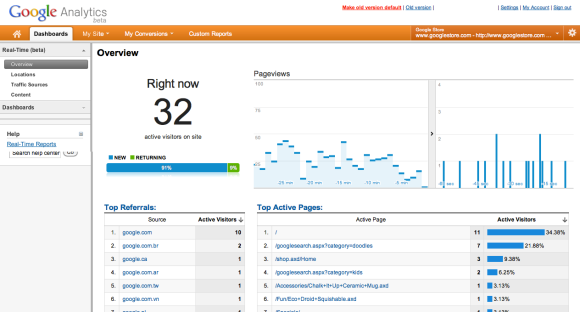
One of the most important parts of a successful Performance Test is getting the requirements right. No matter what tool you use or how well you script, your test won’t succeed if you are not accurately simulating end-user activity on the application. Traditionally, the user volume has been a mix of current load levels from log files and projected load from the business. More recently, analytics have been so easily implementable that every site these days, even small blogs, have analytics information.
So how can we use Analytics to help build a realistic load profile for performance testing? Continue Reading…
I have written before about using the LDAP protocol using LoadRunner. This time, I had a requirement to reset the passwords for all my test users before an execution. Luckily for me, there was already some shell scripts setup that utilised ldapmodify, so it was just a matter of converting them over to LoadRunner scripts. Continue Reading…
Web services are more commonly becoming the targets of Performance tests. This post aims to provide an introduction to testing SOAP with LoadRunner without using the Web Services VUser type. Why not use the Web Services Vuser? Errors like this
System.Reflection.TargetInvocationException: Exception has been thrown by the target of an invocation. ---> System.Xml.XmlException: 'xsi' is an undeclared namespace.
Using the custom web request (as suggested by Wilson Mar, Stuart Moncrieff and many others) bypasses the XML validation steps of LoadRunner, which is a good thing. This is possible because SOAP is just XML over HTTP, so lets take a look. Continue Reading…
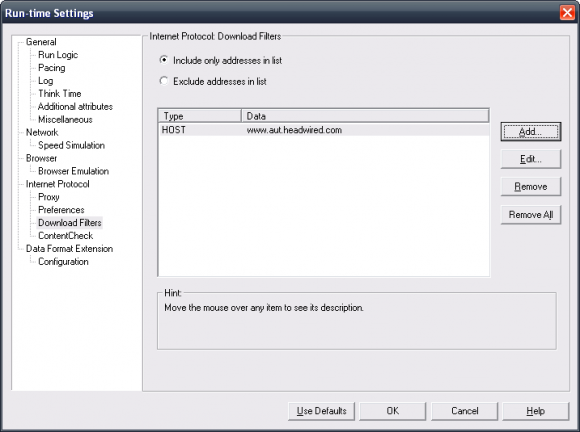
A previously mentioned the move from a download filters black list to a white list to avoid hitting servers outside of our testing scope.
One interesting outcome of this change was a nasty C compile error.
Error: C interpreter run time error: Action.c (39): Error -- memory violation : Exception ACCESS_VIOLATION received.
As it turns out, as we were using a proxy auto-config (PAC) file and this error occurs if your download filters are set to block your pac files. Luckily, LoadRunner does report that the PAC file was “Not downloaded due to a filter”, yet on the very next line reports that it was “downloaded and evaluated successfully”
Starting to download the proxy automatic configuration script, URL="http://www.headwired.com/proxy.pac"  	[MsgId: MMSG-27097]
Warning -26554: Not downloaded due to a filter, URL="http://www.headwired.com/proxy.pac"  	[MsgId: MWAR-26554]
Proxy automatic configuration script (URL="http://www.headwired.com/proxy.pac") downloaded and evaluated successfully  	[MsgId: MMSG-27096]
Surely if iframes are considered a critical resource, then the PAC file should cause an error and not just a warning, especially when it causes such a poorly handled memory violation error.
Luckily adding the pac file location to your download filters include list fixes this problem.
After a recent application update, I noticed that all of our scripts started to fail. It turns out that the AUT now included a piece of tracking code, and our load generators did not resolve the domain name. The error message that came up was:
Error -26627: HTTP Status-Code=404 (Not Found) for "http://tracking.headwired.com/track.asp" [MsgId: MERR-26627]
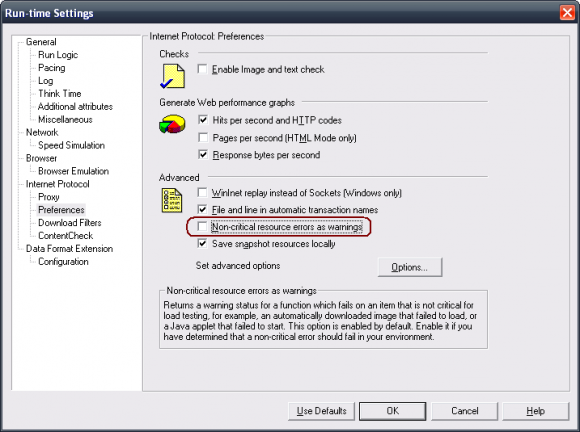
So why would a 404 cause an error and not just a warning? Turns out that iframes are treated as a critical resource. By default, images, scripts, css are all treated as non-critical resources resulting in a warning only, however iframes are considered to be critical and hence cause an error. It makes sense for iframes to be a critical resource… in 1999 when the virtual mall was a good idea, yet in 2011, iframes are used for tracking services only. Rants aside, I could find the option to treat images, scripts and css as critical (pictured below), however I could not find the option to treat iframes as non-critical.
By turning this option off, all 404’ed resources are treated as errors as well, as you can see in the following output log
Found resource "http://localhost/notfound.css" in HTML "http://localhost/iframe.html"  	[MsgId: MMSG-26659]
Found resource "http://localhost/notfound.js" in HTML "http://localhost/iframe.html"  	[MsgId: MMSG-26659]
Found resource "http://localhost/notfound.png" in HTML "http://localhost/iframe.html"  	[MsgId: MMSG-26659]
Detected non-resource "http://localhost/notfound-iframe.html" in "http://localhost/iframe.html"  	[MsgId: MMSG-26574]
Found resource "http://localhost/notfound-object.html" in HTML "http://localhost/iframe.html"  	[MsgId: MMSG-26659]
Error -26627: HTTP Status-Code=404 (Not Found) for "http://localhost/notfound.js"  	[MsgId: MERR-26627]
Error -26627: HTTP Status-Code=404 (Not Found) for "http://localhost/notfound.css"  	[MsgId: MERR-26627]
Error -26627: HTTP Status-Code=404 (Not Found) for "http://localhost/notfound.png"  	[MsgId: MERR-26627]
Error -26627: HTTP Status-Code=404 (Not Found) for "http://localhost/notfound-iframe.html"  	[MsgId: MERR-26627]
Error -26627: HTTP Status-Code=404 (Not Found) for "http://localhost/notfound-object.html"  	[MsgId: MERR-26627]
web_url("web_url") highest severity level was "ERROR", 1627 body bytes, 1438 header bytes  	[MsgId: MMSG-26388]
So back to the problem, a new domain that I needed to block had surfaced and if the domain name resolved, then it would have been included in the tests without my knowledge. While there are two schools of thought here, in the particular testing that I was doing, the customer did not want their tracking sites being hit from the performance tests, it was time to change approach and move to the include only list.
Why was this important? Well now I don’t have to catch every new tracking feature in order to block it, and my ever expanding list of blocked hostnames was now a thing of the past and everything was coming up Milhouse.
My test HTML page is as follows for anyone who is interested.
Joel Deutscher is an experienced performance test consultant, passionate about continuous improvement. Joel works with Planit's Technical Testing Services as a Principal Consultant in Sydney, Australia.



 Web services are more commonly becoming the targets of Performance tests. This post aims to provide an introduction to testing SOAP with LoadRunner without using the Web Services VUser type. Why not use the Web Services Vuser? Errors like this